Mistcodes are promotional codes that can be redeemed in the app for awesome perks.
To enter a Mistcode and unlock your special reward:
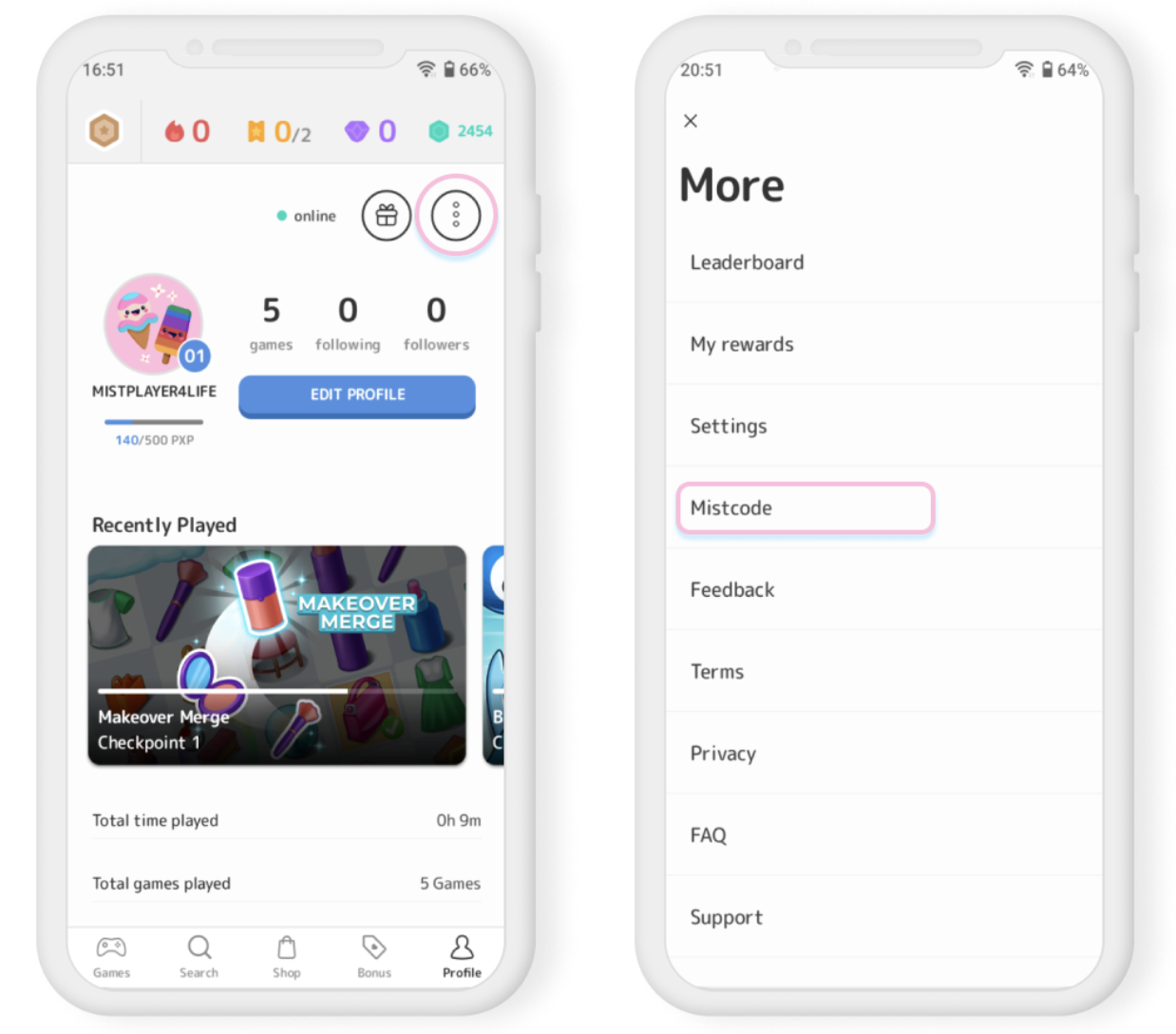
- Open the app and visit the Profile tab
- Tap the button containing 3 dots located at the top right of the screen
- Tap the Mistcode option in the menu
- Enter your Mistcode in the input field then tap Submit to claim your reward!
Please be aware that Mistcodes are case-sensitive, so please pay close attention to the letters you may need to capitalize and your spacing.
If the Mistcode you enter does not work (you may, for example, receive an error message informing you that the code has expired), it may have reached its use limit. All Mistcodes have limits on the number of users that can redeem them, and every code is set to expire eventually.
To find future Mistcodes, keep an eye on our social media channels or our newsletter. Here's how to find our social media channels and subscribe to our newsletter:
1. Visit the Events tab in Mistplay
2. Scroll down to the bottom of the page and look for the options labeled Check Us Out and Subscribe to our Newsletter.
3. Tap on your desired action to be enabled to follow us on social media, and/or subscribe to our newsletter!
How do I redeem a Mistcode on iPhone?
We are thrilled to announce Mistplay for iPhone is now available on the Appstore. If you’re in the US or Canada, click here to download!
-
QR Codes:
- Use your device's camera to scan a QR code. The app will recognize the code and automatically apply the Mistcode to your account.
-
Direct link redemption:
- Click on a promotional link shared via email or social media. The link will direct you to the Mistplay app, and if installed, the Mistcode will be applied automatically.
-
Manual Entry:
- Visit the Settings menu by tapping your avatar icon in the top left of the Mistplay app
- Tap Enter a Mistcode
- Enter your Mistcode in the input field then tap Redeem Code to claim your reward!